audiofakedetectorpro
Audio Fake Detector PRO
Truly Free Alternative
-0088cc)
Advanced audio analysis tool designed to detect fake and artificially upscaled audio using signal processing techniques.
Audio Fake Detector PRO is a high-performance audio authenticity checker focused on identifying fake high-quality audio files, including 320 kbps MP3s, lossless formats, Hi-Res/Ultra-Hi-Res PCM, and native DSD (SACD-derived .dsf / .dff).
💡 Why Audio Fake Detector PRO?
Many audio files distributed online are not truly high quality but have been upscaled from lower-bitrate sources.
Audio Fake Detector PRO is designed to help users identify these cases with a modern, multi-layered detection approach, serving as an independent alternative for users familiar with other tools.
📸 Screenshots
Start_script_no_move.cmd (Intel Core 2 Duo test)
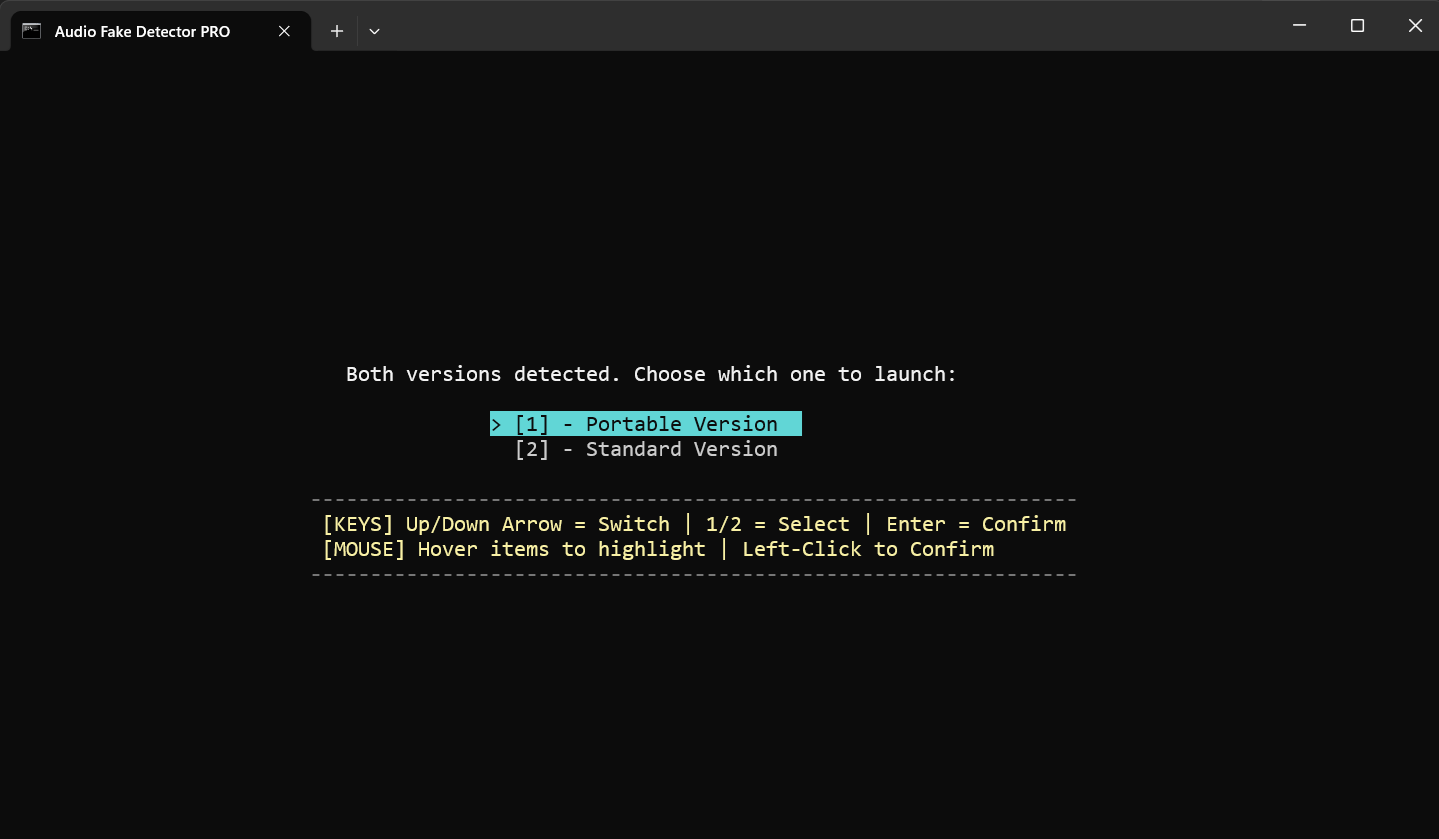
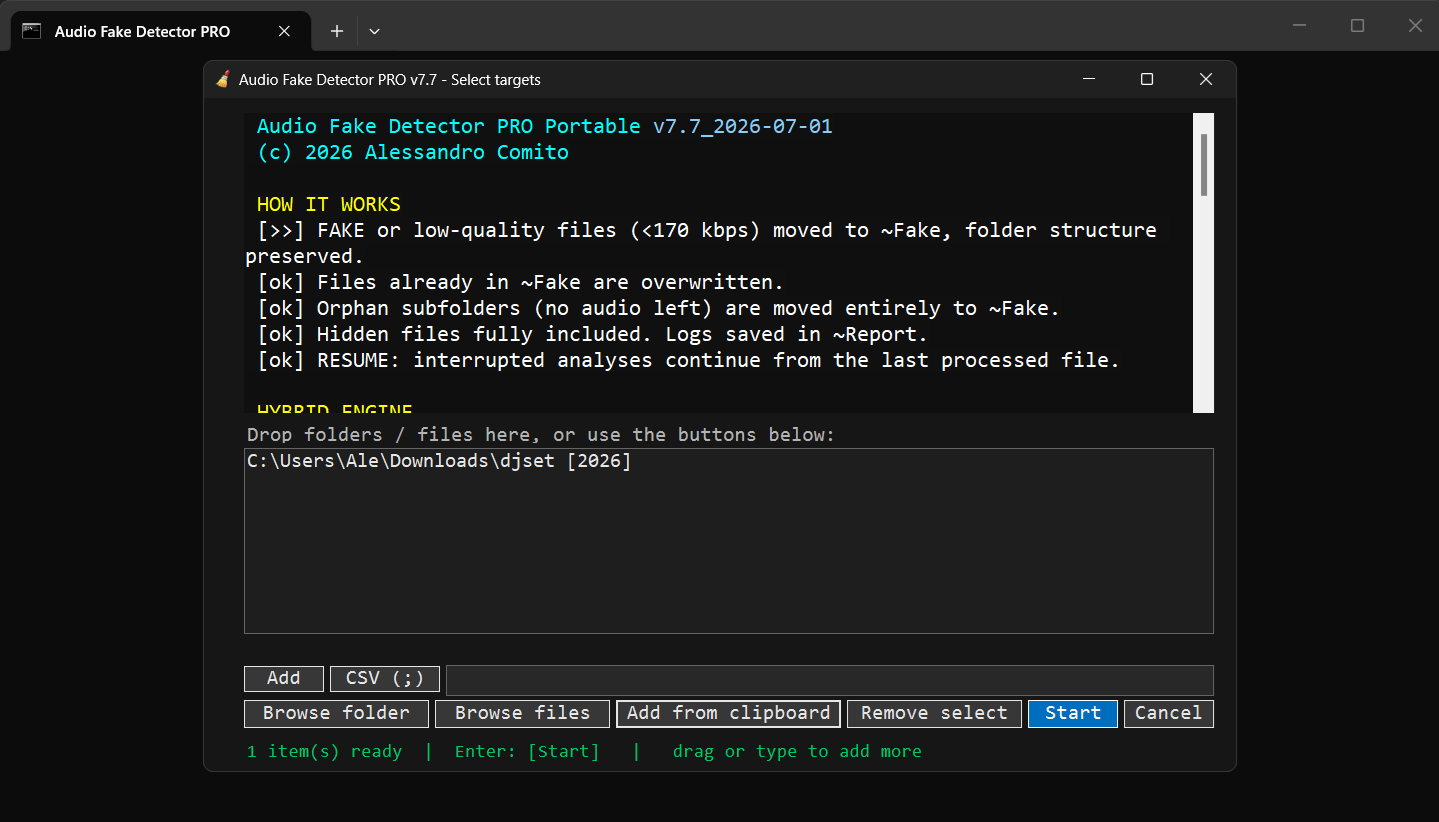
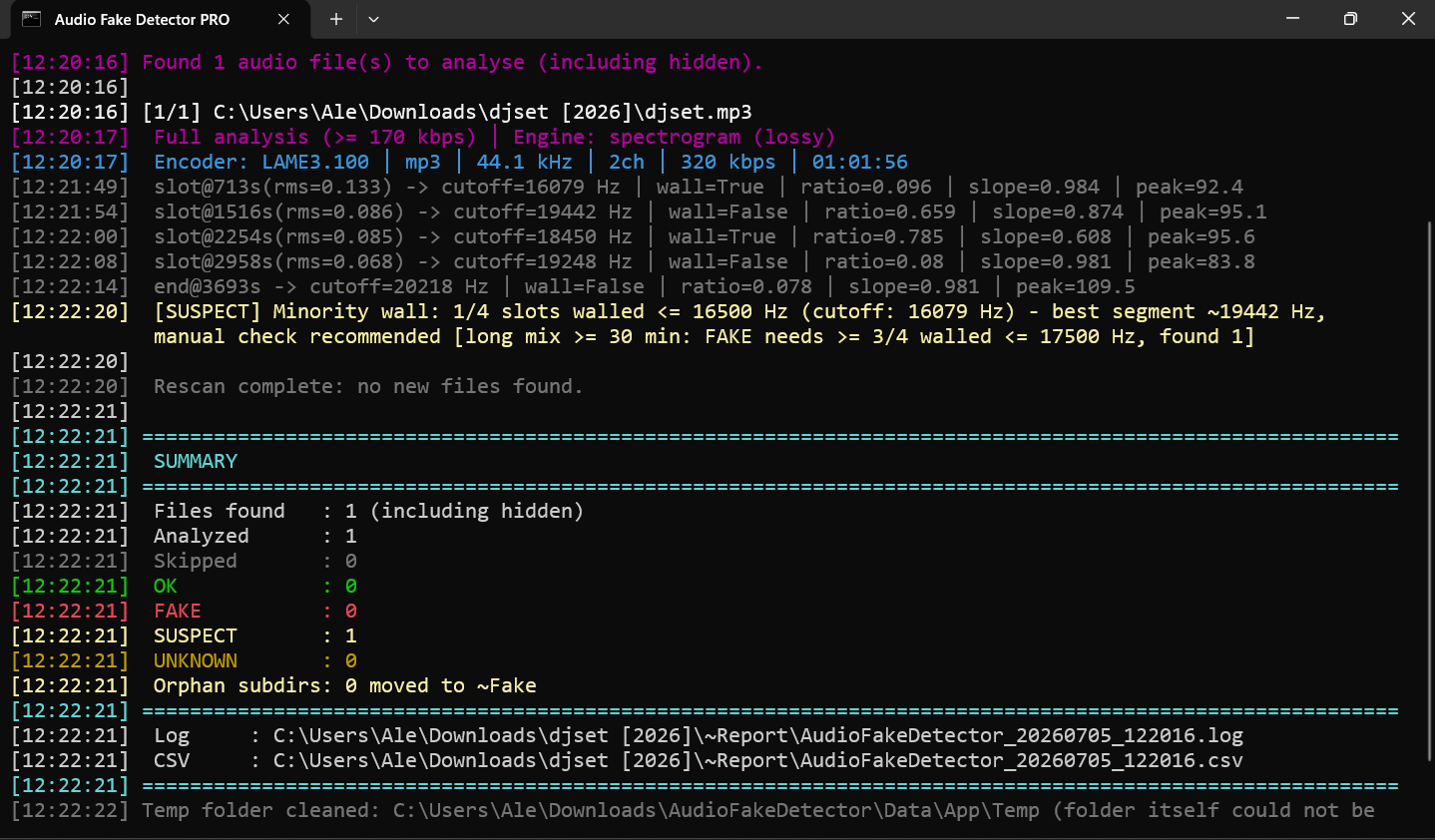
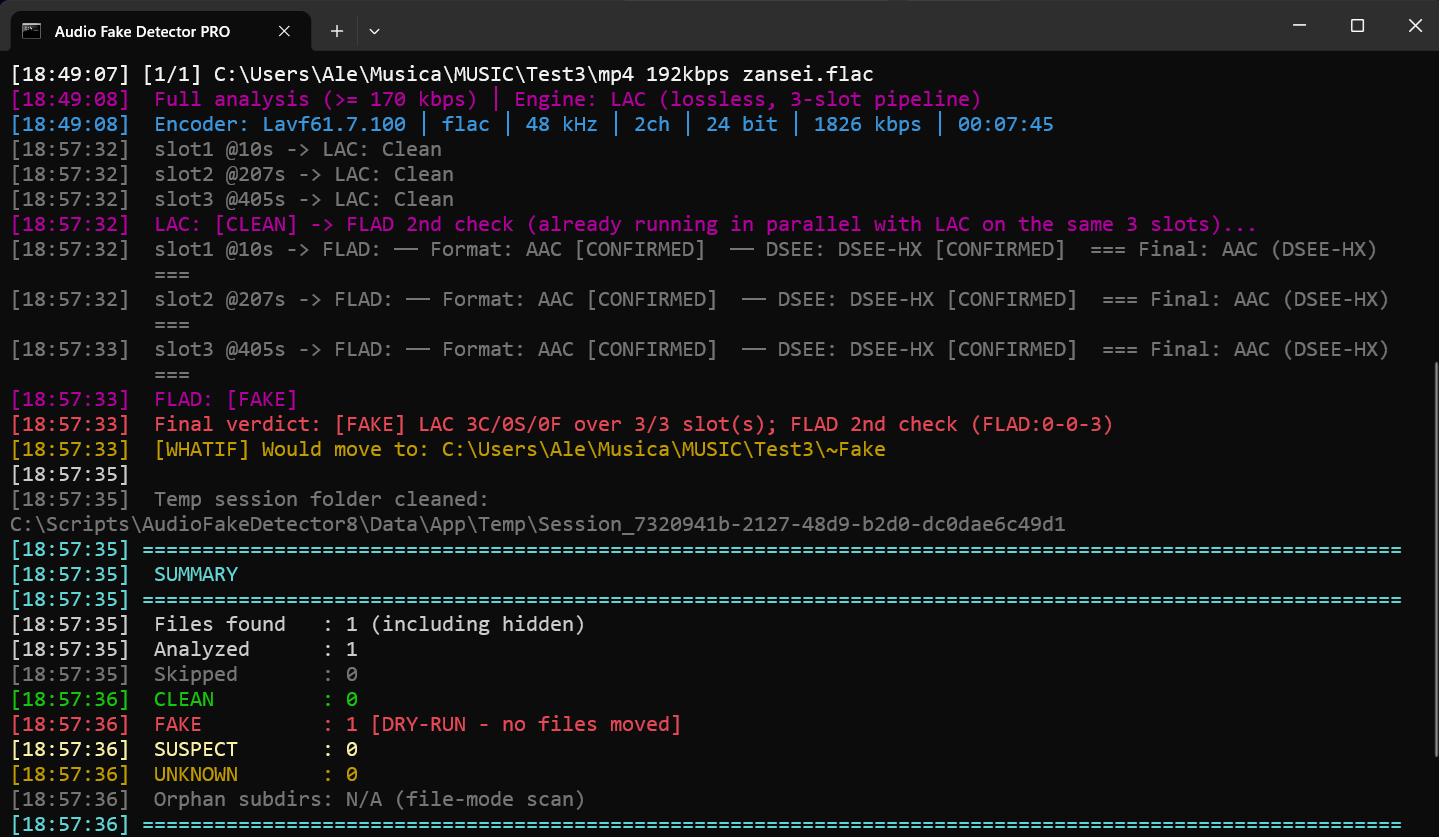
Performance note: Audio Fake Detector PRO prioritizes detection coverage and cross-verification over raw analysis speed.
Some lossless files require significantly more processing time, particularly when LAC and FLAD are both used for independent verification.
If you want to evaluate detection performance rather than speed alone, you can use the following known test files:
mp4 192kbps zansei.flac - a FLAC created from an AAC 192 kbps source
👁️ mp4 192kbps zansei.flac  Google Drive (101 MB)
Self explained
👁️ FAKE_LOSSLESS__MP3_294kbps__DSRE__96kHz_24bit.flac Google Drive (170 MB)
⚙️ Key Features
- Detection of fake 320 kbps MP3 files
- Detection of fake lossless audio (FLAC, WAV, APE, AIFF, WV)
- Hi-Res / Ultra-Hi-Res PCM analysis (up to 384 kHz and beyond) and native DSD support (.dsf, .dff), with DSD-to-PCM noise-shaping recognition to avoid false positives on genuine SACD/DSD-derived content
- Spectral cutoff and compression artifact detection
- Multi-segment frequency analysis
- Joint stereo anomaly detection
- Statistical validation using LAC (Lossless Audio Checker)
- Automatic dependency management (FFmpeg, FFprobe)
- High-performance spectrogram processing
- Detailed reporting: LOG - CSV
On selection window, click to cycle: [CSV ( )] → [CSV (,)] → [CSV (;)] → [CSV ( )] - Moves detected files to the ~Fake folder while preserving the original directory structure
🧠 Detection Technology
Audio Fake Detector PRO uses a hybrid analysis engine:
- Spectral Analysis: detects frequency cutoffs, compression artifacts, and artificial bandwidth extension
- Statistical Validation: verifies lossless authenticity using LAC (Lossless Audio Checker), with FLAD as a second-opinion check on LAC’s “Clean”/”Suspect” verdicts
- Segment-Based Voting System: improves accuracy by analyzing multiple independent audio segments
This approach reduces false positives and improves detection reliability across different audio formats, including Hi-Res/Ultra-Hi-Res PCM and native DSD, where a dedicated noise-shaping signature check tells a genuine SACD/DSD-derived source apart from an upsampled fake.
🔎 Lossless
At each startup, a console prompt allows the user to choose the lossless verification mode.
LAC + FLAD mode is selected by default, while FlacCompagnonCLI mode can be selected as an alternative.
LAC + FLAD mode: Lossless audio is verified using Lossless Audio Checker (LAC 2.0.5) and FLAD (Fake Lossless Audio Detector).
LAC performs the primary command-line analysis. FLAD is invoked only when LAC returns a conclusive “Clean” or “Suspect” result, providing an independent second check.
If LAC identifies a file as “Fake”, FLAD’s 2nd opinion is not required, as the result is already conclusive.
For slot analysis, FLAC files are temporarily converted to WAV segments (slots) for LAC. LAC and FLAD then analyse the same corresponding temporary WAV segment for each slot.
For full-track analysis, LAC analyses the temporary full-track WAV converted from the original FLAC, while FLAD analyses the original FLAC file directly.
Therefore, the temporary FLAC-to-WAV conversion is required only for the LAC analysis path.
Both command-line analyzers run through a unified 3-slot processing pipeline. The LAC/FLAD verification pipeline applies exclusively to lossless PCM audio.
Native DSD files are not passed to, or analyzed by, either command-line analyzer. This dual-verification approach replaces auCDtect.
A lossless PCM file is considered genuine only when both LAC and FLAD support the lossless classification. A negative result from either analyzer is sufficient to reject the file as genuine lossless.
Note: This integration specifically uses the LAC 2.0.5 command-line analyzer and should not be confused with LAC 2.0.7, which launches the graphical user interface (GUI). Like LAC 2.0.5, FLAD is also used as a command-line audio analyzer, providing Hi-Res / Ultra-Hi-Res PCM analysis up to 384 kHz and beyond.
FlacCompagnonCLI mode: FlacCompagnonCLI is used as the sole lossless verification engine. In this mode, LAC and FLAD are not used for lossless verification.
FlacCompagnonCLI is used exclusively for lossless PCM audio; native DSD files are not passed to, or analyzed by, FlacCompagnonCLI.
No FLAC-to-WAV conversion is performed in either slot or full-track analysis. FlacCompagnonCLI analyses the original FLAC file directly in both modes.
FlacCompagnonCLI is a custom command-line frontend based on the open-source FlacCompagnon project.
🎧 DSD
Audio Fake Detector PRO provides native DSD support (.dsf / .dff) independently of LAC and FLAD. Native DSD files are analyzed by the application’s own DSD processing and are not processed through the LAC/FLAD verification pipeline.
The application also provides SACD/DSD-to-PCM noise-shaping detection, allowing DSD-derived characteristics to be identified when analyzing PCM material. This functionality is part of Audio Fake Detector PRO and is not performed by LAC or FLAD.
🛡️ Dual-Engine Precision
The combination of LAC + FLAD provides complementary validation for lossless PCM audio by addressing each tool’s native blind spots:
LAC accurately detects sample-rate upscaling (e.g., 44.1 → 48 kHz).
FLAD helps identify lossy-to-lossless transcodes (e.g., MP3/AAC → WAV/FLAC).
Neither LAC nor FLAD is responsible for native DSD analysis; DSD processing is handled independently by Audio Fake Detector PRO since version 8.4.
This complementary approach is particularly useful because the two analyzers can expose different types of suspicious lossless material that may be missed by the other analyzer alone.
🎚️ Analysis Segment Control
In the selection window, you can define the duration of each non-final analysis segment, from 10 to 160 seconds. The default value is 40 seconds. The final end-spot segment used for lossy audio always has a fixed duration of 10 seconds.
The number of analysis slots depends on the audio type:
- Lossless PCM and DSD: 3 analysis slot
- Lossy: 5 analysis slots in total: 4 regular segments plus a final end-spot segment with a fixed duration of 10 seconds.
The program automatically determines the position of each segment within the track based on its total duration.
Shorter analysis segments provide faster analysis, while longer segments may provide more representative results for some files.
📦 Supported Formats
Lossy: MP3, AAC, M4A, OGG, OPUS, WMA
Lossless: FLAC, WAV, APE, AIFF, AIF, WV (up to Ultra-Hi-Res, e.g. 352.8/384 kHz and beyond)
Native DSD: DSF, DFF (DSD64/128/256/512 - decimated to DXD 352.8 kHz/24-bit PCM for analysis; requires ffmpeg.exe/ffprobe.exe, always available with v8.x’s bundled or auto-installed FFmpeg)
Matroska: MKV, MKA, MKS, MK3D
📌 Requirements
- OS: Windows 10/11 (64-bit)
- .NET 8 Runtime (automated download and silent install provided)
- PowerShell: 5.1 (pre-installed on Windows 10/11)
- Network: Internet connection required on first run (for dependencies download)
🛠️ Technical Limitations
High-Bitrate Lossy Re-encoding
Re-encoding a 192 kbps (or higher) lossy file into a higher-bitrate lossy format (e.g. 320 kbps) can be challenging to detect. Modern lossy encoders at 192 kbps already maintain a very high frequency cutoff, leaving little to no detectable spectral gap for cutoff-based analysis.
🚀 Download & Dependencies
🔗 Automatic Dependencies
If required tools are not found locally, they will be downloaded automatically when Start is clicked in the window selection:
-
FFmpeg - source: BtbN/FFmpeg-Builds (76.4 MB) / Gyan (104 MB)
📥 v8.1.2 LGPL Zip / 📥 v8.1.2 Essentials Zip -
Lossless Audio Checker (LAC) 2.0.5 - source:
/ V1REU (105 KB)
📥 Google Drive Mirror / LAC-Windows-64bit.zip -
7-Zip Console Executable - source: 7-Zip (588 KB)
📥 EXE (GitHub) -
FLAD - source: Sg4Dylan/FLAD (27 MB)
📥 7-Zip (GitHub) -
.NET 8 Runtime (27.3 MB, automated download and silent install provided) - source: dotnet.microsoft.com
📥 Direct EXE Installer
To avoid automatic download of .NET 8 Runtime from dotnet.microsoft.com, install manually via Command Prompt:
winget install Microsoft.DotNet.Runtime.8
🌐 Preview
Source: Google Drive
- AudioFakeDetector8.7z/zip (x64) (PowerShell 5.1 scripts: Standard + Portable)
📄 Preview 📥 7-Zip (34.4 MB) 📥 Zip (59.9 MB) - AudioFakeDetector8_slim.zip (Portable+Standard editions, web downloads)
👁️ Preview 📥 Zip (2.18 MB)- Note:
- Portable only: delete
AudioFakeDetector_v8.x.ps1from archive - Standard only: delete
AudioFakeDetector_v8.x_Portable.ps1from archive
- Portable only: delete
- Note:
📁 Files and Folders
Executables, DLL, JSON, state/stamp files
Standard: %LOCALAPPDATA%\AudioFakeDetector\ | Portable: .\Data\App\
For the 3-slot lossless analysis pipeline (LAC + FLAD or FlacCompagnonCLI), each of the 3 parallel slots runs against its own physical copy of ForceRedirect.exe, the active lossless engine, flad_cli.exe, and FLAD’s model folder. Slot 1 uses the copy in the tool folder above; slots 2 and 3 use their own copies, verified and repaired (by file size) on startup and again before every full-track file:
Standard: %LOCALAPPDATA%\AudioFakeDetector\slot2\, %LOCALAPPDATA%\AudioFakeDetector\slot3\ | Portable: .\Data\App\slot2\, .\Data\App\slot3\
Full-track analysis uses the tool folder’s own copies for LAC; FLAD reuses slot2’s copy instead of a third on-disk copy, since full-track and the 3-slot pipeline never run at the same time.
Spectrogram PNGs, WAV segments, TXT logs (deleted after each track analysis)
Standard: %TEMP%\ | Portable: .\Data\App\Temp\
FLAD’s own per-slot spectrogram PNGs (deleted after each track analysis, for all 3 per-slot copies)
Standard: %LOCALAPPDATA%\AudioFakeDetector\Tmp\, ...\slot2\Tmp\, ...\slot3\Tmp\ | Portable: .\Data\App\Tmp\, .\Data\App\slot2\Tmp\, .\Data\App\slot3\Tmp\
💬 Support & Community
Have questions, bug reports, or want to discuss features? Join the official thread on Audio Science Review:
👉 Audio Science Review - Audio Fake Detector PRO Forum Thread
⚠️ Disclaimer
This tool is independent and not affiliated with any other audio analysis software.
🧾 Keywords (SEO)
fake audio detector, fake mp3 detector, audio authenticity checker, fake flac detection, audio analysis tool, spectral analysis audio, lossless verification tool, mp3 upscaling detection, fake DSD detector, DSF DFF authenticity, SACD rip verification, Hi-Res audio verification